LogiSAM

LogiSAM — Supply Area Management Software
- Count & request — Schedule counts and handle routine and exceptional requests.
- Replenish & track — Track counts and orders, review shipments, and follow up on shortages.
- Analyse & refine — Review usage and Min/PAR levels, and identify items with no recorded use.
- Maintain & coordinate — Manage item profiles, flags, and labels, record transfers, and synchronize item data.
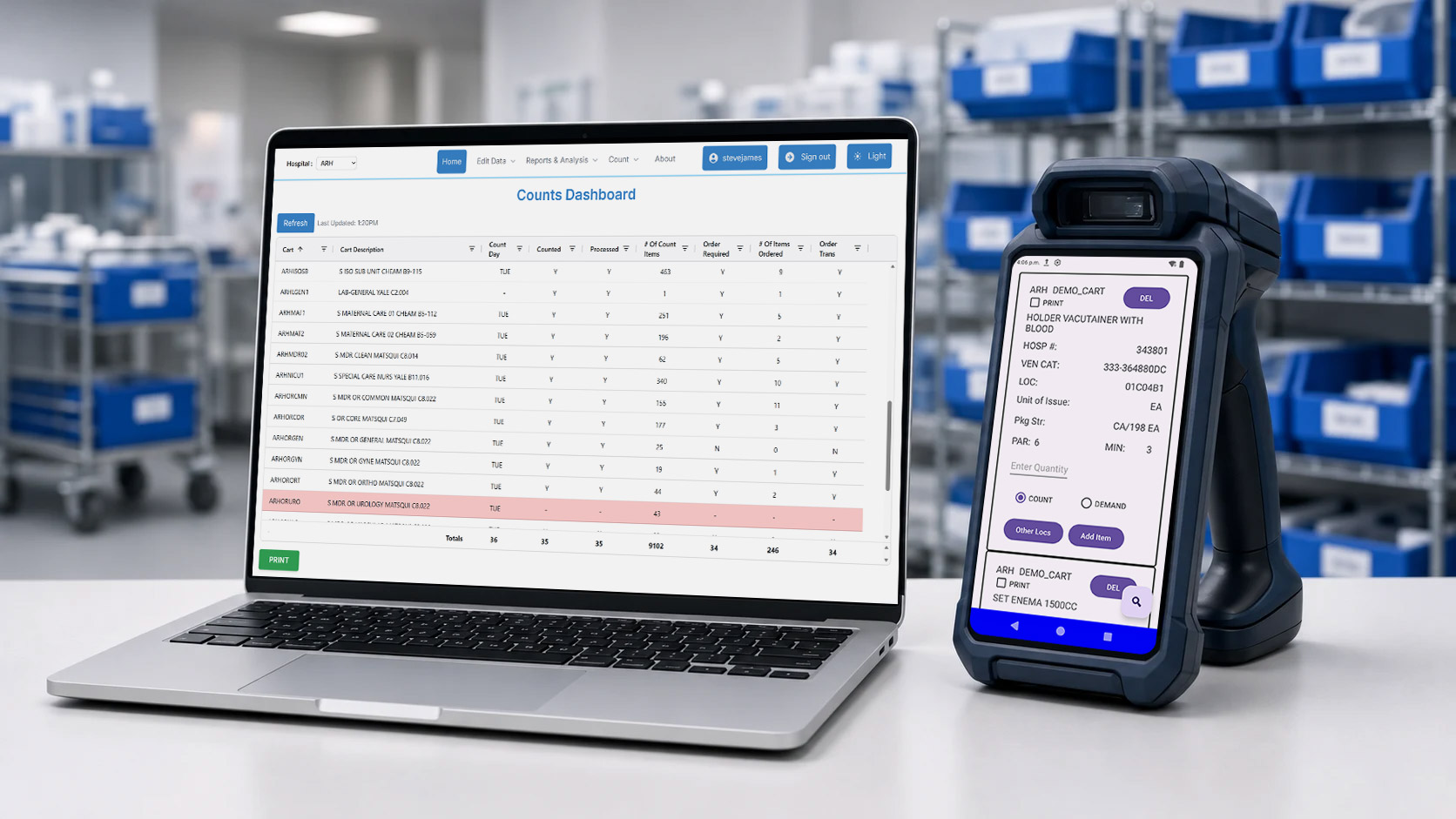

Hospital Supply Area Management
LogiSAM is a cloud-based system for hospital teams managing supplies in wards, supply rooms and carts.
- Integration with existing systems. LogiSAM can connect with your hospital’s ERP or warehouse systems, with interfaces confirmed during planning.
- Better use of supplies. Use item usage and stocking-level data to help reduce waste and allocate supplies where they’re needed.
REPLENISHMENT WORKFLOW
See where replenishment needs attention.
Follow daily count activity.
Review daily scheduled count activity, order processing and placement. Identify missed counts and work awaiting processing.
Review shipment follow-through.
Once LogiSAM receives and processes shipment data, the dashboard shows shipment acknowledgement, the number of backorders, and fill rates.
See the supply areas affected.
Identify backordered and partially fulfilled items by affected supply area to support targeted notification and follow-up.
POINT-OF-USE EFFICIENCY
Manage supply needs
at the point of use.
Counts and demand, together
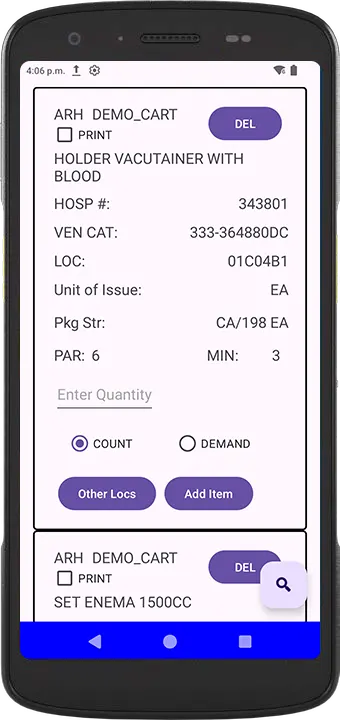
Record quantities on hand, request above-PAR amounts and add items not normally stocked in the area through the same handheld workflow. Item-level schedules help coordinate routine counting, while demand entry supports surges or an unexpected patient mix without permanently changing the standard profile.
Find and transfer supplies during urgent stockouts
Use the handheld to look up where an item is assigned across your site or network. Once you confirm stock at another location, record the transfer directly on the handheld.
Capture label needs as you go
Flag missing or damaged labels during the count, then generate the flagged barcode labels together.
BEYOND THE COUNT
Practical control.
Across every supply area.
Keep profiles, stocking decisions and supply exceptions connected to the people doing the daily work.
Review stocking levels
Use PAR analysis to compare historical usage and replenishment activity with current Min/PAR settings. Use No Usage reports by cart or cost centre to identify items that need review.
Maintain an item in one view
See every cart containing an item, review recent usage and maintain each cart’s Min, PAR and location settings without opening profiles separately.
Prioritise important supplies
Set item-specific count schedules and make counts mandatory for designated critical, expiry-dated or pandemic supplies. Flag critical items at department level, and identify expiry, pandemic/disaster, hazardous-goods and latex items at site or network level.
Manage change with less entry
Clone existing cart profiles, organise product categories, and support substitute items and product-conversion processes.
Record interdepartmental transfers
Record supplies moved between departments to support financial allocation and reconciliation.
Make storage easier to identify
Generate barcoded bin, shelf and cart labels with detailed item information so staff can identify supplies at a glance. Choose label templates for different storage bins to support consistent scanning and replenishment.
WORKFLOW DETAILS
Built for the realities
of supply-area work.
Explore the controls that support day-to-day exceptions, review and administration.
Replenishment review and quality assurance
Review and adjust calculated replenishment quantities before generating orders. The quality assurance process supports review of items that do not meet reorder levels and their exclusion from orders, according to the agreed configuration.
Expiry management
Support department-level expiry audits and review expiry-dated products within supply areas. Use the audit process to identify items requiring attention and support follow-up.
Multiple counters
Multiple staff can share counting work within the same department, allowing teams to divide the workload across its supply locations. This flexibility helps teams organise counting activities and work toward order cut-off times.
Synchronize with the hospital item master
The hospital’s host system is the authoritative source for item master data. LogiSAM uses that data to update shared item information across the carts and supply-area profiles that use each item. This keeps item details consistent and reduces the need to make the same update on multiple carts.
When handheld devices are unavailable
Use an Android tablet or notebook connected to Wi-Fi to enter counts and demand quantities directly in the Desktop Count module. If direct entry is unavailable, use printed count sheets as a last resort. Enter the recorded quantities in Desktop Count once access is restored so they can be processed for replenishment.
CASE STUDY
Abbotsford Regional Hospital
Abbotsford Regional Hospital brought its established supply replenishment workflow to the cloud with LogiSAM.
Cloud deployment
Abbotsford Regional Hospital moved its established supply replenishment workflow to the cloud. LogiSAM runs without a dedicated on-site LogiSAM server.
Seamless integration with hospital systems
LogiSAM can exchange item and order data with legacy systems and modern ERP platforms. API-based interfaces can support interoperability where the hospital’s systems support them.
Dashboards for counts and fulfilment
LogiSAM dashboards help teams track scheduled counts and transmitted orders and compare ordered and fulfilled quantities.
LET’S TALK ABOUT YOUR SUPPLY AREAS
See LogiSAM in the context
of your daily work.
Schedule a LogiSAM demo with Fred Jasavala.
Email Fred to request a demo fjasavala@logihedron.comTell us how you manage your supply areas today. We can walk through counting, exceptional demand, replenishment follow-up and stocking-level review, and discuss your existing ERP or warehouse interfaces.
Are you looking to cut supply
chain costs in your hospital?
Discover our solutions and services

GENERAL CONSULTING

Logistics Operations Assessment

Point-of-Use Optimization Program

CENTRALIZED DISTRIBUTION